Private by design

Your identity isn't an open inbox.

Aura replaces the phone number and email address with a revocable Reach Contract, so people can only reach you the way, and for as long, you allow.

  • No phone number or email needed
  • Revoke one sender or one device
  • Web, Android, macOS, Linux

Messages, notes and files are end-to-end encrypted in the Aura Android app. The web and desktop apps work differently — here is exactly how.

Illustrative example of Reach Contract states.

Available on four surfaces

Web Android macOS Linux
The problem with addresses

Open inbox vs. closed inbox.

A phone number or email address is a standing invitation: anyone who has it can reach you, forever, until you change it. Aura inverts that default.

Today

Open by default

  • Your number and address are open — anyone who has them can contact you indefinitely.
  • Blocking is reactive: the spam, scam, or unwanted message already reached you.
  • Support, marketing, and personal messages all land in the same inbox.
  • Revoking access usually means changing your number or address entirely.
With Aura

Closed by default

  • Your identity never becomes a public address — discovery returns an opaque handle, not a contact route.
  • Every sender needs an active Reach Contract before a single message is delivered.
  • Permissions are scoped by purpose — transactional, support, social, marketing stay distinct.
  • Revoke one relationship, or one device, without losing your identity.
One coherent workspace

Everything important, without the noise.

Aura brings communication and personal information together without turning your identity into a public address.

Communicate

Chat, mail-style messages, groups, voice, and video, each with relationship-level permissions. Forms can be sent only to people already in Aura, with sensitive questions declared up front (new, not yet verified on real devices).

Remember

Private notes that sync across your devices, plus an encrypted on-device Vault for files and scans.

Control

Decide who can contact you, why they can contact you, and when that permission ends.

In the app

Permissions you can actually see.

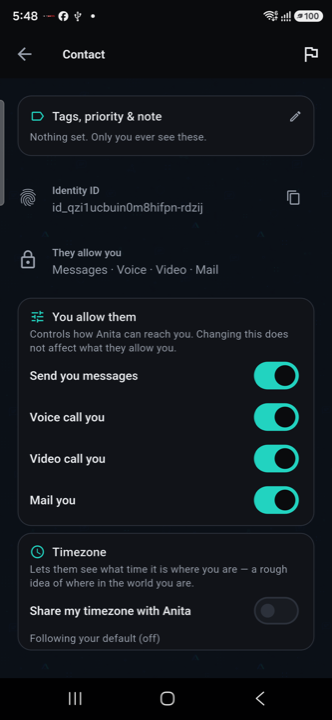
Every contact has its own switches for messages, voice, video, and mail — changeable any time, and separate from what they allow you.

  • Per-contact permissions. Turn each channel on or off for each person.
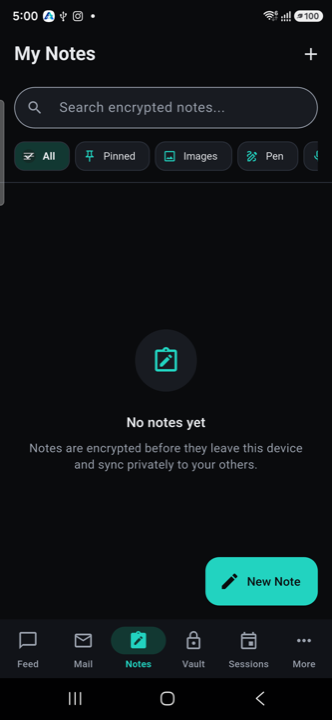
  • Notes that stay private. Encrypted before they leave your device, synced privately to your others.
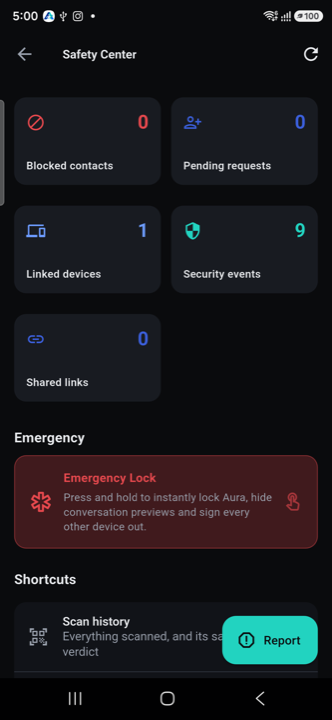
  • A Safety Center. Review linked devices and security events, or lock Aura instantly with Emergency Lock.
Aura contact screen with switches for allowing messages, voice calls, video calls and mail from one contact
Per-contact permissions
Aura My Notes screen with the message that notes are encrypted before they leave the device
Private notes
Aura Safety Center showing linked devices, security events and an Emergency Lock control
Safety Center

Screenshots from the Aura Android app.

Under the hood, in plain language

How a closed inbox actually works.

Four concepts carry the whole model. No protocol knowledge required to use it — but nothing here is hidden, either.

01

Identity

You create an Aura identity in the app, with no phone number or email. It's a stable identity, not an open inbox address.

02

Device

Each device you use gets its own signing and encryption keys. Lose one, revoke it — your identity stays intact.

03

Reach Contract

A sender requests permission. You grant a scoped, purpose-limited contract — with an expiry, if you want one.

04

Conversation

Only permitted senders reach your mailbox. In the Android and desktop apps the relay stores ciphertext it cannot read; the hosted web app differs — see why.

Security and privacy

Honest about where encryption happens.

Whether we can read your messages depends on which Aura you use. We set it out per platform instead of averaging it into one claim.

Android app

End-to-end encrypted

Keys are generated and held on the phone. Messages, notes and files are sealed there before they leave it; our servers hold ciphertext and the routing metadata needed to deliver it.

Desktop apps

Keys stay on your computer

A local Aura process on your own machine holds your keys and does the encryption, so our servers see ciphertext. Keys are sealed under your passphrase. Source for desktop 0.3.0 adds an operating-system credential store, but ad-hoc builds skip it and the downloadable builds are still 0.1.0.

Hosted web app

Not protection against us

Accounts created on the web app since 5 October 2026 keep their keys in your browser, locked with your passphrase and never sent to Aura; our servers relay ciphertext. But our website still supplies the page's code, so this does not protect you from a malicious or compromised host. Older web accounts are different: our web service holds their keys and opens their messages, so our servers can see content (they can move to browser-held keys).

Independent devices

Revoke a lost device without abandoning your identity.

Visible purpose

Transactional, support, social, and marketing access remain distinct.

Intentional sharing

External delivery is explicit and clearly marked as a privacy downgrade.

Not externally audited

No independent cryptographic review has been carried out, and we say so.

Side by side

Aura vs. the open address book.

Same goal — people reaching people — with a different default for who gets to initiate contact.

DimensionEmail / SMS / phone numberAura
Address modelOpen and guessable — once known, it can be used indefinitelyOpaque handle; a Reach Contract is required before delivery
Revoking a senderUsually means changing your number or addressRevoke that one contract — everything else keeps working
Purpose separationOne inbox for support, marketing, personal, and spamTransactional, support, social, and marketing stay distinct
Lost deviceThe number or account itself is exposedRevoke the device; your identity and other devices are unaffected
What the server seesVaries by provider — often full message contentOn Android and desktop, ciphertext and delivery metadata only. On the hosted web app, new accounts (since 5 October 2026) keep keys in the browser and we relay ciphertext, though our site supplies the page's code; older accounts are readable by our web service — see Security
Get Aura

Pick your platform.

Start in the browser, or install an app. Each platform has different trade-offs, and the download page spells them out before you install anything.

Web

Use Aura in a modern browser with nothing to install. New accounts keep keys in the browser, older ones are server-held, and the site still supplies the page's code; see Security.

Open web app

Android

End-to-end encrypted. Installed as an APK, not through Google Play, so updates are manual.

Install notes

macOS

Apple Silicon and Intel. An early build that is not code-signed, so macOS needs a one-time workaround.

Install notes

Linux

AppImage, DEB and RPM. An early build; packages are unsigned, so verify them by checksum.

Verify a download
Frequently asked

Straight answers.

The questions people ask first about identity, keys, and what the server can see.

Is Aura another email address?

No. Aura identities do not create an open inbox. Communication begins through a permission-controlled relationship — a Reach Contract — not by anyone knowing your address.

Where are my keys?

It depends on which Aura you use. On Android, keys are generated and held on the phone. On desktop, a local Aura process on your own computer holds them. On the hosted web app, accounts created since 5 October 2026 keep their keys in your browser (locked with your passphrase, never sent to Aura), but our site still supplies the page's code. Older web accounts are server-held: a service we operate holds the keys, so we can technically see your content. If that does not work for you, use Android or desktop.

The full answer is on the FAQ page.

Can I use several devices?

Yes. Each device has independent keys and can be revoked separately. Use device linking for routine additions and reserve the recovery key for total device loss.

Can Aura read my messages?

On Android and desktop your keys are on your own device and we hold only encrypted envelopes, so we cannot read message content. On the hosted web app we technically can for older accounts whose keys our web service holds; for newer ones the keys are in your browser, though our site supplies the page's code. We do not read, scan or log hosted-web content, but that is our conduct, not a technical limit. On every surface we can see routing metadata.

Ready when you are

Close your inbox to everyone but the people you choose.

Open Aura in your browser, or install the app for your platform. Read what each platform protects before you choose.